Create a Tournament
To create a tournament either
- click on the New Tournament
 in the Toolbar, or
 - call menu item Tournament -> New
This will open up the Tournament Creation Dialog
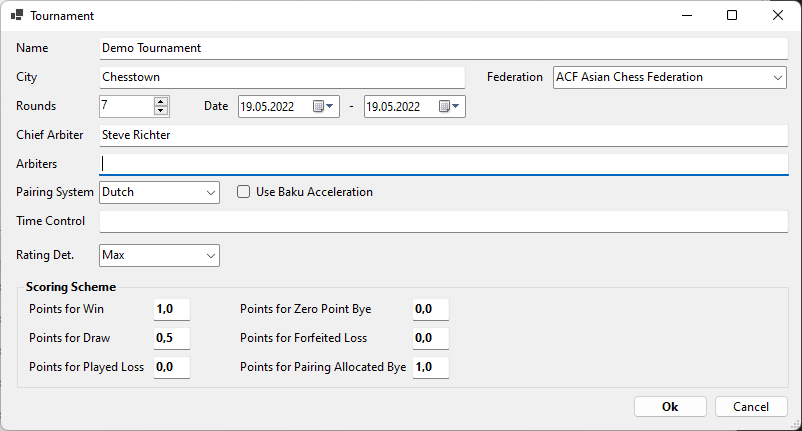
Most of the fields should be self-explanatory. There are however some fields which need further explanation:
- Pairing System: You have 2 options Dutch and Burstein. You can find detailed explanations at the FIDE website. If in doubt choose Dutch.
- Use Baku Acceleration: This will pair according to the rules of Baku Acceleration
- Time Control: This is only a text field used for information purposes. You are free to enter the time control in any format you like or to leave it empty
- Rating Determination: If a participant has 2 ratings (FIDE Elo and national rating) you can choose here how the tournament rating is determined: Max (use the higher rating), Average (use the average of the 2 ratings), Elo (use FIDE Elo rating, if available) or National /use National rating if available)
- Scoring Scheme: This allows to use alternative scoring schemes (like 3 points for a win and 1 point for a draw)
For the purpose of this tutorial it's sufficient to enter Name, City and a Chief Arbiter. Enter some values there and press ok
Created with the Personal Edition of HelpNDoc: Produce electronic books easily